The IGNOU Assignment Front Page is an important part of an assignment submission for students enrolled in Indira Gandhi National Open University. Students are generally required to attach a properly filled assignment front page with their assignment before submitting it through the applicable IGNOU assignment submission process.
The front page provides important information that helps identify the student, programme, course and assignment. Providing accurate details on the front page can make it easier for the university, regional centre or study centre to identify and process the submitted assignment.
Students should download the front page, fill in the required information carefully and attach it to their assignment according to the applicable submission instructions.
What Is the IGNOU Assignment Front Page?
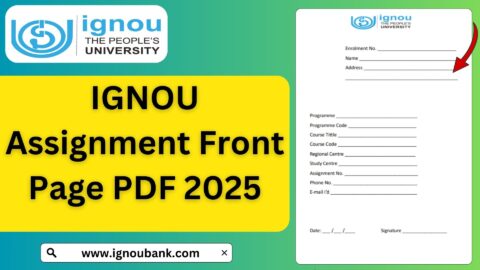
The IGNOU assignment front page is a cover sheet attached to an assignment submitted by an IGNOU student. It contains important information about the student and the assignment.
The front page helps identify details such as the student’s enrollment number, programme, course code, study centre and other relevant information.
Since thousands of assignments are submitted by students from different programmes and regional centres, providing clear identification details is important.
Students should ensure that the information written on the front page matches their IGNOU admission and academic records.
IGNOU Assignment Front Page Download
Students looking for an IGNOU Assignment Front Page download can use the following PDF:
IGNOU Assignment Front Page PDF:
https://ignoubank.com/wp-content/uploads/2023/05/IGNOU-Assignment-Front-Page-IGNOUBANK.COM_.pdf
You can open the PDF on your mobile phone or computer and download or print it.
After downloading the front page, fill in all the required details carefully before attaching it to your assignment.
Important Links and Information
| Information | Details |
|---|---|
| Document | IGNOU Assignment Front Page |
| Format | |
| Download Front Page | https://ignoubank.com/wp-content/uploads/2023/05/IGNOU-Assignment-Front-Page-IGNOUBANK.COM_.pdf |
| University | Indira Gandhi National Open University |
| Required For | IGNOU Assignment Submission |
| Important Details | Enrollment Number, Programme, Course Code and Student Details |
| Student Name | Write your name as per IGNOU records |
| Enrollment Number | Enter your correct IGNOU enrollment number |
| Programme Code | Enter the applicable programme code |
| Course Code | Enter the course code for the assignment |
| Study Centre | Enter your applicable study centre details |
| Submission | Follow the applicable IGNOU assignment submission instructions |
How to Download IGNOU Assignment Front Page
Downloading the IGNOU assignment front page is a simple process.
Step 1: Open the PDF Link
Visit the following link: https://ignoubank.com/wp-content/uploads/2023/05/IGNOU-Assignment-Front-Page-IGNOUBANK.COM_.pdf
The PDF should open in your browser or PDF viewer.
Step 2: Download the PDF
Use the download option provided by your browser or PDF viewer to save the file to your device.
You can save it in a folder containing your other IGNOU documents.
Step 3: Print the Front Page
After downloading the PDF, print the front page on a suitable sheet of paper.
Make sure the complete page is printed clearly and that no important section is cut off.
Step 4: Fill in Your Details
Write the required information carefully.
Before submitting your assignment, check every detail against your IGNOU admission and course information.
Details Required on the IGNOU Assignment Front Page
Students should provide accurate information on the front page. The exact fields can vary depending on the format being used, but important student and assignment information generally includes the following.
Student Name
Write your full name clearly.
The name should match the name associated with your IGNOU student record.
Avoid using unnecessary abbreviations or a different spelling.
Enrollment Number
The enrollment number is one of the most important details on the assignment front page.
Enter your complete IGNOU enrollment number carefully.
An incorrect enrollment number can make it difficult to associate the assignment with the correct student record.
Programme Code
Write the programme code for your IGNOU programme.
For example, different undergraduate, postgraduate, diploma and certificate programmes have different codes.
Check your admission documents if you are unsure about your programme code.
Course Code
The course code identifies the particular subject for which the assignment has been prepared.
Write the correct course code on the front page.
If you are submitting assignments for several courses, make sure that each assignment has the appropriate course code.
Course Title
Where the front page provides a space for the course title, enter the appropriate title corresponding to the course code.
Check your assignment question paper or programme details to make sure that the course title is correct.
Study Centre
Enter your applicable IGNOU study centre information.
Students should check their admission or study centre information if they are uncertain about the correct centre details.
Regional Centre
If the front page requires regional centre information, enter the applicable IGNOU regional centre.
This information should correspond with your student record.
Submission Date
If a submission date field is available, enter the relevant date according to the applicable assignment submission process.
Why Is the IGNOU Assignment Front Page Important?
The front page is useful because it provides identifying information about the assignment.
An assignment may pass through several stages of collection, evaluation and record management. Clearly mentioning student and course details helps identify the assignment.
For students, the front page also provides a structured way to present important information before the actual assignment answers begin.
A properly completed front page can therefore help keep your assignment organized.
How to Fill IGNOU Assignment Front Page Correctly?
Students should follow a few simple precautions while filling out the front page.
First, write all information clearly. If the information is handwritten, make sure the handwriting is readable.
Second, double-check the enrollment number.
Third, make sure the programme code and course code are correct.
Fourth, verify the study centre and regional centre information if these fields are included.
Finally, check the entire front page before attaching it to your assignment.
Should the IGNOU Assignment Front Page Be Printed?
If you are submitting a physical assignment, printing the front page is generally useful because it can be attached to the beginning of the assignment.
For online submission, students should follow the specific instructions provided for their assignment submission process. If a scanned assignment is required, the completed front page can be included at the beginning of the scanned document where applicable.
The exact submission method can vary according to the instructions applicable to the student’s programme, regional centre and assignment cycle.
Where Should the Assignment Front Page Be Placed?
The assignment front page should generally be placed at the beginning of the assignment.
The purpose is to provide the identification information before the assignment answers.
If you are preparing a physical assignment, place the completed front page before the pages containing your answers.
If you are preparing a scanned PDF for online submission, include the completed front page as the first page of the document when required by the submission instructions.
What Information Should Be Checked Before Submission?
Before submitting your assignment, carefully verify the following:
- Your name
- Enrollment number
- Programme code
- Course code
- Course title
- Study centre
- Regional centre, if required
- Submission date, if required
- Assignment details
- Number of pages, where applicable
A final check can help you identify simple errors before submission.
Common Mistakes While Filling IGNOU Assignment Front Page
Students sometimes make mistakes while completing their assignment cover page.
One common mistake is entering an incorrect enrollment number. Since the enrollment number is used to identify the student, it should be checked carefully.
Another common mistake is entering the wrong course code. Students taking multiple courses should be particularly careful because each assignment can have a different course code.
Some students also forget to mention their study centre or provide incomplete information.
Another issue is poor handwriting. If the information cannot be read easily, it may create unnecessary confusion.
Students should therefore complete the front page carefully and review it before submitting the assignment.
IGNOU Assignment Front Page for Different Programmes
IGNOU offers a wide range of undergraduate, postgraduate, diploma, certificate and other programmes.
Students from different programmes may have different assignment questions and course codes. However, the purpose of an assignment front page remains broadly the same: to identify the student and the assignment.
Students should always make sure that the programme and course information written on their front page matches the assignment they are submitting.
For example, if you are submitting an assignment for one course, do not accidentally write the course code of another subject on the front page.
Can I Use the Same Front Page for All Assignments?
A student may use the same general front-page format for different assignments if it is applicable to their submission requirements. However, the information on the page must be changed according to each assignment.
The course code, course title and other course-specific information should correspond to the particular assignment.
If you are submitting five different assignments, check each front page separately before submission.
IGNOU Assignment Front Page PDF
Students who need a printable PDF can download the IGNOU assignment front page from the following link:
https://ignoubank.com/wp-content/uploads/2023/05/IGNOU-Assignment-Front-Page-IGNOUBANK.COM_.pdf
After downloading the PDF, you can print it and complete the required information.
It is recommended that students save the PDF on their device so they can access it again when preparing assignments for different courses.
Tips for IGNOU Assignment Submission
The front page is only one part of preparing an assignment. Students should also pay attention to the assignment questions and applicable submission instructions.
Before submitting an assignment, make sure that you have answered the questions according to the requirements.
Check the course code and assignment details.
Make sure your enrollment number is correct.
If submitting online, prepare the scanned document according to the specified format and size requirements.
If submitting physically, follow the instructions applicable to your study centre or regional centre.
Always keep proof of submission where available, such as a receipt, acknowledgement, email confirmation or submission screenshot.
What If I Make a Mistake on the Front Page?
If you notice an error before submitting your assignment, correct it carefully or prepare a new front page.
It is better to correct an error before submission rather than submitting an assignment containing incorrect student or course information.
If an assignment has already been submitted and you later notice a significant error, contact the relevant IGNOU authority or study centre for guidance.
FAQ about IGNOU Assignment Front Page 2026
What is the IGNOU Assignment Front Page?
The IGNOU Assignment Front Page is a cover sheet containing important student and assignment information. It is placed at the beginning of an assignment.
What details should I write on the IGNOU assignment front page?
Important details can include your name, enrollment number, programme code, course code, course title, study centre and other applicable information.
Is the enrollment number important on the assignment front page?
Yes. The enrollment number is an important student identifier, so it should be entered correctly.
Should I mention the course code?
Yes. The course code should be entered correctly because it identifies the particular course for which the assignment is being submitted.
Can I use one front page for multiple assignments?
You can use the same general front-page format, but each assignment should have the correct course-specific information.
Should the front page be placed before the assignment answers?
Yes. The completed front page should generally be placed at the beginning of the assignment so that the student and course information appears before the answers.
Can I use the front page for online assignment submission?
If your applicable submission instructions require or permit a front page, you can include the completed front page when preparing the scanned assignment. Always follow the instructions applicable to your particular submission process.
What should I do if I enter the wrong enrollment number?
Correct the information before submitting the assignment. If the assignment has already been submitted, contact the appropriate IGNOU authority or study centre for guidance.
Can I download the front page on my mobile?
Yes. You can open the PDF link on a smartphone and download or print the document, provided your device and browser support PDF files.
Should I save the assignment front page PDF?
Yes. Saving the PDF can be useful because you may need to prepare assignment front pages for multiple courses.
Conclusion
The IGNOU Assignment Front Page is an important part of preparing and submitting assignments. It provides essential information such as the student’s name, enrollment number, programme code, course code and study centre details, helping identify the assignment correctly.
Students should fill out the front page carefully and verify every detail before submitting their assignment. Particular attention should be given to the enrollment number and course code because these details are important for identifying the student and the relevant course.
If you are looking for the IGNOU Assignment Front Page PDF, you can download it here:
Download IGNOU Assignment Front Page:
https://ignoubank.com/wp-content/uploads/2023/05/IGNOU-Assignment-Front-Page-IGNOUBANK.COM_.pdf
After downloading the PDF, print it if required, complete the relevant details and place it at the beginning of your assignment. Also remember to follow the assignment submission instructions applicable to your programme and study centre.
Keeping a copy of your completed assignment and proof of submission is also a useful practice for future reference.